Built by us, for small businesses
Our Cyber Essentials toolkit.
Windows tools that check your computers, network and firewall, show where the business stands, and safely fix the common problems.
You run one check. We do the rest.
Our toolkit is two programs, joined by a single encrypted file.
The Device Check
A small program we prepare for your business. You run it on each Windows computer. It reads the settings, changes nothing, and saves a report.
See the Device Check ↓ The part we use · in-houseOur consultant toolkit
Our in-house program. It organises everything we gather about your business, then produces your business report and the other reports, plans and documents you get from us.
See our toolkit ↓Part 1 · The part you use
The Device Check.
We send you a copy made for your business, so there’s nothing to install or type. Up to 36 checks per computer, in a few minutes.
Let’s check this computer
Checks how this computer is set up against Cyber Essentials, then saves a PDF for you to read and an encrypted copy to send to us.
- Read-only. It changes nothing.
- Private. No files, emails or passwords.
- Sends nothing. Saved to Downloads.
Control 1 of 5
Firewalls
- 1Firewalls
- 2User access control
- 3Secure configuration
- 4Malware protection
- 5Security updates
0 checks done. Nothing on this computer is changed.
Your report is ready
29 looks good4 worth checking3 action needed
YesNo
Code-signed, so you know it’s ours. The Device Check is signed through Microsoft Azure. Windows shows Blackdown Digital Services Limited as the verified publisher before it runs.
Read-only
It only reads settings. It changes nothing on the computer.
Private
No files, emails, browsing or passwords are collected.
Sends nothing
Both files are saved to your Downloads folder. You choose when to send one to us.
Encrypted
The copy you send us can only be opened by Blackdown Digital.
Made for you
Your copy is in your business name and works until the date shown on its start screen.
Just want this part? Our Device Check is £300 for up to 10 Windows computers, with a report for each and a summary for the business.
Then you send us one file. It’s encrypted, and only Blackdown Digital can open it. The PDF stays with you.
Part 2 · The part we use · in-house
Our consultant toolkit.
You never install or touch this one. Your files open here, alongside the network inventory and firewall review, and we work out what to fix first.
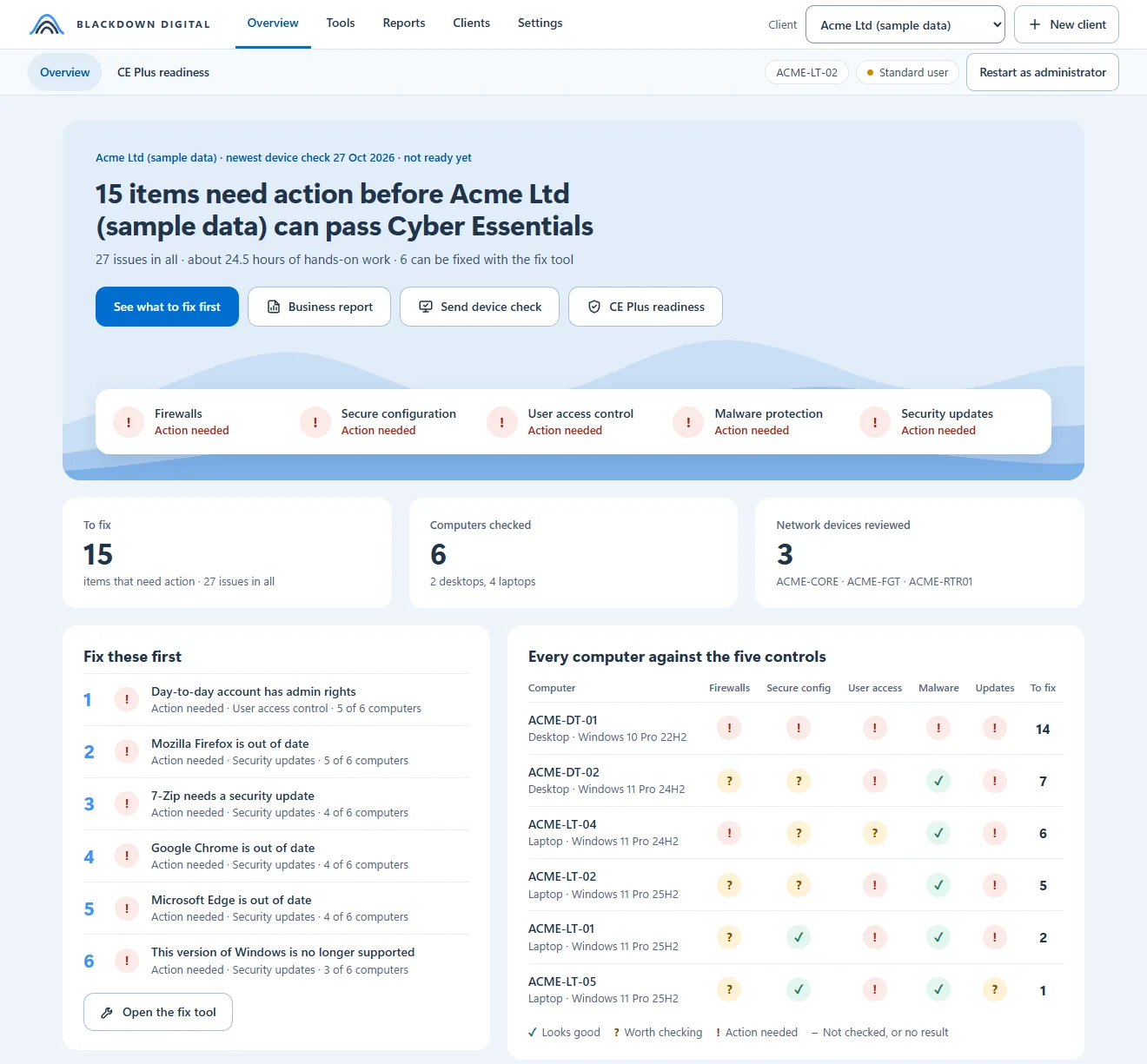
What comes back to you
- Business report
- Fix plan with time and costs
- Policy and evidence pack
- Draft questionnaire answers
Seven tools inside it.
Each one does a single job. Together they take us from your first check to a business ready to apply.
Device check
The same read-only check you run, built in for when we’re with you.
Fix tool
Puts the common problems right, only with your agreement, with a log and an undo script.
Business report
Brings every device check together, with a plan, costs and draft questionnaire answers.
Network inventory
Lists the routers, printers and other devices a computer already knows about. Passive.
Config review
Reads router, firewall and switch configuration files and reports what the internet can reach.
Policy pack
Short, ready-to-sign policies and evidence documents, filled in from your checks.
Email check
A one-page look at your email security, using public records only.
What you get back.
Four reports, each answering one question, and written for the person running the business rather than the IT team.
Device report
What needs fixing on this computer?
Each computer gets its own report, written for the person running the business, not just the IT team.
Download a sample (PDF, 15 pages)- Up to 36 checks across the five Cyber Essentials controls
- Every finding explains what we found, why it matters and what to do
- A time estimate for each fix, and the questionnaire question it affects
- The details the questionnaire asks for, such as installed browsers and Office versions
Business report
Where does the whole business stand?
We combine every device report into a single business report, so you can see what's widespread and what to tackle first.
Download a sample (PDF, 22 pages)- The most widespread issues, and how many computers each affects
- One "fix these first" list across the business
- A plan with the hands-on time for each fix, with estimated costs if you want them
- Draft answers for the self-assessment questionnaire
- Progress since earlier checks, so you can see what's been fixed
Network inventory
Is anything on the network being missed?
Everything that connects to your business network can be in scope for Cyber Essentials. Our network inventory helps make sure nothing gets left out.
Download a sample (PDF, 4 pages)- Lists the devices a computer already knows about, such as routers, printers and storage
- Flags devices that don't have a device check yet
- Checks your Wi-Fi security and spots open networks in range
- Passive: it doesn't scan the network, sign in to anything or use passwords
Firewall and router review
What can the internet reach?
Your firewall or router is the front door to your business, and one of the first things an assessor looks at. Our review shows exactly what's exposed, what's risky and what to change.
Download a sample (PDF, 8 pages)- Five areas checked: admin access, passwords and accounts, what the internet can reach, services and settings, and firmware
- Openings to the internet found in the configuration, such as Remote Desktop or a CCTV recorder left reachable
- The exact settings at fault, with why each one matters and what to do about it
- Draft answers for the firewall questions in the Cyber Essentials self-assessment
- Made from the configuration file alone: nothing connects to the device or your network
- Reads configuration files from many common makes of router, firewall and managed switch
See it on your own computers.
Our toolkit is used in all three packages: Device Check, Gap Assessment and Full Support. Book a free 20 to 30 minute scoping call to get started.